Not an expert in localization lingo? This article uses industry-specific terms like TMS, CAT tools, TM, NMT, and more. Check out our Localization Terminology Glossary for quick definitions of all the key concepts.
The Translation Problem Nobody Solved
The translation world gives you plenty of choices—they just never seem to be in one place.
You get free machine translation here, translation agencies there, glossary somewhere else, and your workflows end up scattered across tools that were never built to work together.
And the problem isn’t a lack of tools. It’s that every tool only solves one small part of the workflow and none of them adapt to the different types of content businesses deal with every day.
Pure machine translation tools like Google Translate and DeepL are fast and affordable, but they offer no translation memory, no terminology control, no team collaboration, and no professional translation options when you’d really need them. (Not sure about the difference between AI translation and machine translation?)
Traditional translation agencies can be slow, opaque, and expensive. You send content into a black box, wait days or weeks, and hope it comes back right. You don’t have control.
CAT tools like memoQ and Trados are powerful, but they’re built for professional translators—not business teams. Steep learning curves, expensive licenses, and no AI speed.
TMS platforms like Smartling and Phrase focus on developers and software localization. Complex setup, technical overhead. (See our comparison of the best translation management systems.)
| Tool | Type | Strong Points | Weaknesses |
|---|---|---|---|
| Taia | Hybrid (AI + NMT + Human + TMS) | Instant translation with upgrade to human review, glossary + TM support, 65+ file types | Still in beta version |
| DeepL | Neural MT + AI assist | Easy to use, more fluent in European languages than other tools | Limited language & format coverage, no translation memory |
| Google Translate | Neural MT + AI assist | Huge language coverage, fast & free | No customization, lacks translation memory |
| ChatGPT | AI (LLM-based) | Flexible, fluent, creative output | Hallucinations, non-deterministic, lacks TM/glossary |
| Claude | AI (LLM-based) | More conservative and polite tone generation | Not translation-specific, still experimental |
What businesses actually need is flexibility—the ability to choose the right approach based on content type, quality requirements, and internal resources.
That’s why we built Taia.
How Taia Works: The Three-Mode Platform
Taia is the only translation platform that gives you three ways to work—all in one place. Choose your mode based on what you’re translating, switch anytime, even mid-project.
One Platform. Three Modes. Infinite Flexibility.
Yellow Mode: AI Translation (100% Self-Serve)
What it is: Instant AI document translation in 189 languages and 65+ file types, with original formatting preserved.
Free for 50 languages and 5 file types up to 5,000 words per month.
Our AI engine translates full documents—not isolated sentences—so it understands context and terminology across the entire file. This means fewer errors, more consistent tone, and far better results than segment-by-segment MT.
Best for: High-volume content, quick turnarounds, internal documents, product descriptions, anything that needs speed and scale and where perfect language is not a dealbreaker.
How it works:
- Upload your file
- AI translates in seconds (using your translation memory and glossaries on the PRO plan)
- Download the translated file with original formatting preserved
Key features:
- Private AI models (your content is NEVER used for training)
- Adaptive learning from your translation memory and glossaries (PRO plan only)
- Format preservation across DOCX, PPTX, JSON, XLIFF, and 60+ other file types
- Supports PDF, but formatting depends on the quality of the document (learn why PDF translation with AI is tricky)
- Instant results—entire documents translated in seconds
Pricing: Free up to 5,000 words/month. 20,000 words for $10/month. Add translation memory & glossaries for $45/month.
Try AI Translation Free
Translate documents in 189 languages with formatting preserved. 5,000 words/month free.
Go to the AI Translator →Red Mode: Translation Management for In-House Teams
What it is: Your in-house translation management hub, combining project coordination, task assignment, terminology control, and a full professional CAT editor in one place. It gives your internal team everything they need to refine AI output, maintain brand voice, and manage multilingual content with consistency and visibility.
Best for: Teams with internal language resources, content owners who want to control tone and terminology, iterative refinement, quality control without outsourcing everything.
How it works:
- Start with an AI translation
- Create a project and assign edit/review tasks to team members
- Team members refine translations in the CAT editor with TM/glossary support
- Track progress, resolve comments, and manage approvals
- Export final content or push updates via API
Key features:
- Full translation management system: projects, tasks, workflows, role permissions
- Integrated CAT editor for segment-level refinement
- TM and glossary suggestions applied across all reviewers
- Automatic terminology highlighting
- Progress tracking across languages, files, and reviewers
- Unlimited team members and shared billing
- Role-based access control (Admin, Manager, Reviewer, Translator, Viewer)
Typical workflow: AI does the first draft (yellow mode), in-house reviewers refine for brand voice, tone, accuracy, etc.
Pricing: Included in Pro plan ($45/month). No per-seat licensing. Unlimited users. Team-based billing options and translation memories.
Manage Translations In-House
Full TMS with CAT editor, translation memory, and glossaries. Unlimited team members.
Explore the TMS →Book a Demo →Blue Mode: Professional Language Services
What it is: Outsource your translations to the Taia team—your dedicated project manager has access to 2,000+ ISO 17100-certified linguists for content that demands expert quality.
Best for: Legal contracts, medical documents, marketing launches, regulated content, anything brand-critical or compliance-sensitive.
How it works:
- Upload your file
- Choose your quality tier (Essential, Enhanced, or Ultimate)
- Get an instant quote with delivery date options
- Order and get a dedicated project manager who takes over
- Professional linguists translate and review
- Receive professionally translated, publication-ready output
Need Expert Human Translation?
Access 2,000+ ISO 17100-certified linguists for content that demands expert quality.
Explore Professional Language Services →Three quality tiers (all include your dedicated PM):
- Ultimate (Highest Quality): Professional translator + independent reviewer + proofreader. Best for legal, medical, regulated industries, brand launches.
- Enhanced (Premium Quality): Professional translator + independent reviewer with advanced QA checks. Best for marketing content, customer-facing materials, website localization.
- Essential (Standard Quality): Professional linguist performs MTPE (machine translation post-editing). Best for high-volume content, internal documents, general business content.
(Deep dive: Professional Translation Quality Tiers Explained)
Pricing: Instant quotes starting from €0.06/word. Choose your delivery date. TM leverage discounts automatically applied.
Get Your Translation Quote
Upload your file, choose your quality tier, and get an instant quote with delivery options.
Get an Instant Quote →Mix and Match: Hybrid Workflows
The real power of Taia is that you can combine all three modes based on your needs. This human + AI hybrid approach gets you the best of both worlds:
Example 1: AI translation (yellow) → in-house review (red) → professional polish for final deliverables (blue)
Example 2: Bulk product catalog with AI (yellow) and in-house review (red), critical marketing pages with professional linguists (blue)
Example 3: AI baseline (yellow) → assign to bilingual team member for brand refinement (red)
Everything happens in one dashboard.
When to Use Each Mode – Examples
| Content Type | Recommended Mode | Why |
|---|---|---|
| Product descriptions (1,000s) | Professional, then AI | Speed + volume, glossary & TM ensure consistency |
| Marketing campaign (brand-critical) | Professional (Essential) → In-house review | Fast baseline, refined by people who know your brand |
| Legal contract | Professional (Ultimate) | Requires subject-matter expertise |
| Internal documentation | AI | Fast, affordable, "good enough" quality |
| Website localization | Professional (apply Localization Pyramid) | Sort pages by priority and apply different quality tiers |
| Medical device manual | Professional (Enhanced/Ultimate) | Regulated content, accuracy critical |
| SaaS UI strings | AI → In-house | Developers review in context with CAT editor |
| Customer support content | AI → In-house review | Speed + brand voice consistency |
The Localization Pyramid: A Practical Way to Choose the Right Workflow
One of the biggest problems teams face is treating every piece of content as if it needs the same level of translation effort. It doesn’t. A homepage is not a product manual. A contract is not a blog post. A tooltip is not a marketing campaign. (Related: Building a Localization Strategy with AI + Human Hybrid Translation)
The Localization Pyramid is Taia’s framework for deciding exactly which workflow each type of content should go through—AI, hybrid, or full professional translation—based on impact, risk, and how visible the content is to customers.
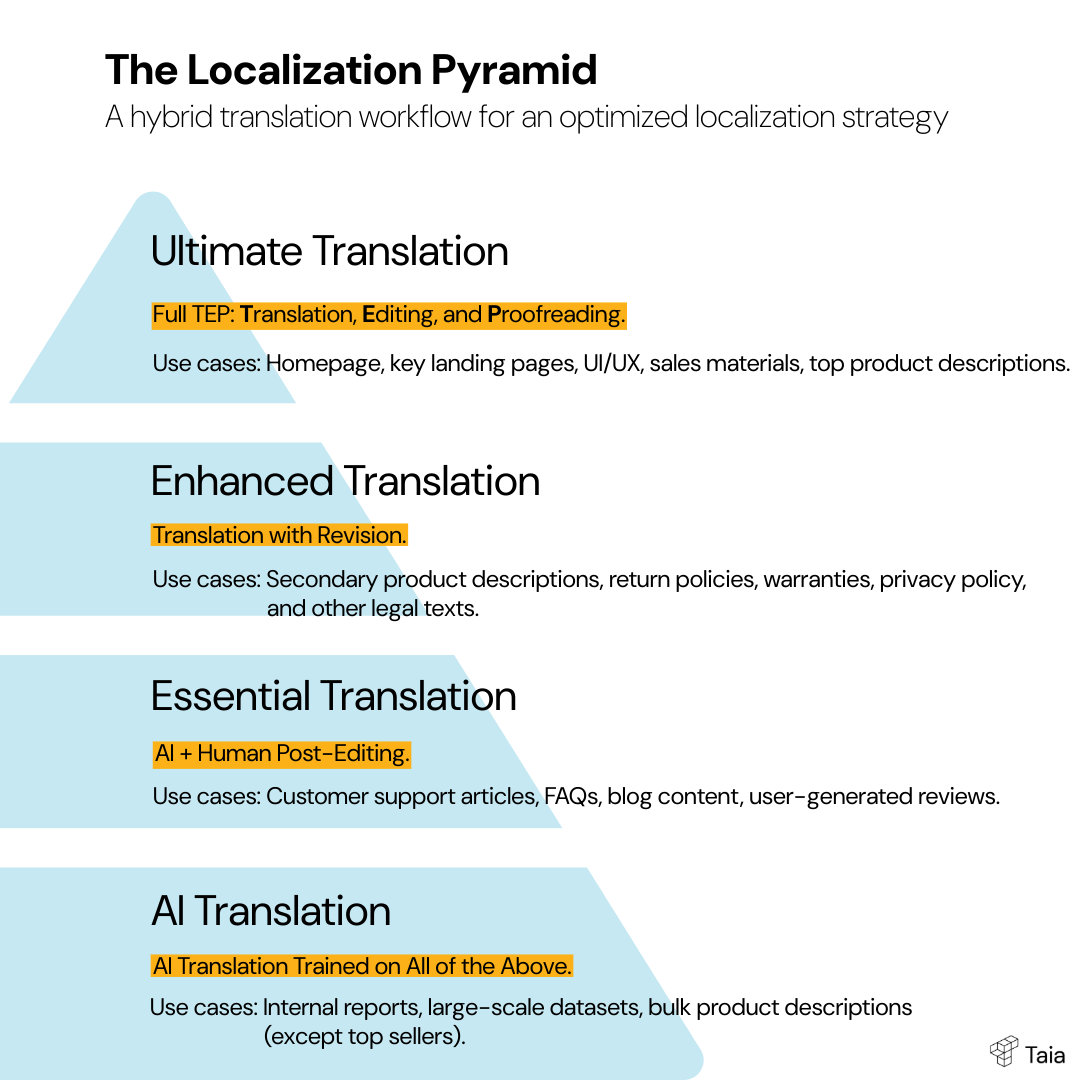
Here’s how it breaks down.
Tier 1: High-impact, customer-facing content
These are the pieces that directly affect revenue, product adoption, or brand trust. If they’re wrong or unclear, users feel it immediately.
Examples:
- Homepage, landing pages, key product pages
- Conversion copy (headlines, CTAs, pricing pages)
- Crucial UI elements (navigation, onboarding steps)
- Important legal or compliance text
Recommended workflow: Full TEP - the Ultimate tier (Translation + Revision + Proofreading)
You need perfect clarity, correct terminology, and culturally appropriate messaging. These pieces deserve a full human workflow with revision. (See also: 8 Lessons About Marketing Localization and 3 Rules for Translating Marketing Materials)
Tier 2: Critical product and legal content
Content that may not drive conversions directly but must be accurate and unambiguous.
Examples:
- Terms of service, privacy policies (learn about the 4 types of legal translations)
- Product instructions, safety information
- High-use knowledge base articles
- Support documentation for core features
Recommended workflow: Professional translation with revision (Enhanced tier)
Accuracy matters more than style here. You don’t need marketing polish, but you do need consistency and legal safety.
Tier 3: Important but lower-risk content
Content users read for clarity, education, or general understanding. If the tone isn’t perfect, it’s fine—the goal is simply to communicate clearly.
Examples:
- Blog posts
- Email flows
- Tutorials
- FAQs
- Secondary product pages
Recommended workflow: Hybrid: AI + MTPE (Essential tier)
AI does the heavy lifting, and a reviewer adjusts terminology, fluency, and tone. Fast, accurate, and cost-efficient.
Tier 4: High-volume internal or long-tail content
Large amounts of repeating text where perfect style isn’t necessary and visibility is low.
Examples:
- Internal documentation
- Research notes
- Large product catalogs
- Low-traffic help articles
- Reports
Recommended workflow: AI translation (but only AFTER it has learned from the professional tiers above)
It’s the fastest and most cost-effective option. It learns based on your TM and glossaries, so terminology stays consistent without manual effort.
Because Taia’s AI considers full-document context, even AI-first workflows maintain terminology and context consistency across long sections of text.
Why the Localization Pyramid Works
This framework removes guesswork. It helps teams decide exactly how to handle each type of content and prevents over-investing in pieces that don’t need human polish—or under-investing in the content that shapes customer perception.
Choose the workflow that fits the content instead of forcing everything through one system.
The Core Taia Features Explained
AI Translation Features
Instant Translation Engine
Translate entire documents in seconds—not hours, not days. Upload a 50-page DOCX file, get it back translated in under a minute.
- 189 languages supported, from major global languages to regional variants (Brazilian Portuguese, Canadian French, Latin American Spanish) and low-resource languages.
- 65+ file types including:
- Documents: DOCX, PDF, XLSX, PPTX, ODT, RTF, TXT, MD
- Developer formats: JSON, YAML, XML, XLIFF, PO, PROPERTIES, RESX
- Web: HTML, PHP
- Mobile: Android XML, iOS strings
- Subtitles: SRT, VTT, SUB
- Design: IDML (InDesign)
- Private AI models mean your content is NEVER used for training. Unlike Google Translate or DeepL, your confidential documents stay confidential. (Compare: DeepL Alternatives for Teams)
- Adaptive learning: Our AI improves by learning from YOUR translation memory and glossaries—not generic internet data. The more you use Taia, the better it gets at translating your specific content.
- Format preservation: Upload a formatted document, get back a translated document with the exact same layout, fonts, styles, and structure.
Translation Memory (TM)
Every translation you approve becomes reusable memory. Future projects automatically match against your TM, so you only pay for new or changed content.
Save up to 70% on repeated content.
How it works:
- Every approved translation creates a memory segment
- When you upload new content, Taia checks for matches in your TM
- 100% matches are reused for free
- Partial matches (95-99%, 85-94%, etc.) cost less than new translations
- Works across all file types and projects
New Content Arrives
”Download our guide”
TM Scans Database
Searching for matches…
Match Found
100% or fuzzy match
Saved for Reuse
Added to memory
Real-world savings:
- Product documentation updates: 60-70% TM leverage = 60-70% cost reduction
- Website updates: 40-50% TM leverage on revised pages
- Marketing campaigns: 30-40% TM leverage (seasonal messaging, recurring CTAs)
Import/export TMX to migrate from other tools (Trados, memoQ, Phrase, Memsource, etc.) or back up your data. Your translation memory is portable—no vendor lock-in. Learn more about how translation memory works for modern localization workflows.
AI learning: Your AI translator learns from your TM, producing more accurate baseline translations that align with your approved style.
Team sharing: Share translation memory across your organization for company-wide consistency.
Glossary Management
Lock in your terminology to ensure perfect brand consistency across languages. (Deep dive: Glossary Management Guide for Fast Localization)
- Create unlimited glossaries organized by domain, brand, product line, or project type.
- Term enforcement: AI automatically applies approved terms from your glossary.
- Multi-language support: Define a term once (e.g., “cloud storage” in English), specify translations in all target languages, and Taia enforces it everywhere.
- Import/export CSV or TBX formats for easy migration from other systems.
Why glossaries matter:
- Prevent AI from translating brand names, product terms, taglines
- Ensure technical terms stay consistent (e.g., “machine learning” always translates the same way)
- Maintain brand voice across global markets
- Reduce post-editing time by 30-40%
Use cases:
- Brand terms: Product names, taglines, company-specific vocabulary
- Technical terminology: Industry jargon, acronyms, UI strings
- Legal vocabulary: Contract clauses, compliance terms, disclaimers
- Marketing voice: Preferred phrasing, tone guidelines, CTAs (pair with a translation style guide for best results)
Example Glossary Entries
UI element - always use “panel de control”, not “tablero”
Brand name - do not translate “Taia”
Technical term - SEO keyword for French market
In-House Team Features
Built-in CAT Editor
Professional-grade translation editor built right into the platform. No need for desktop software or external tools.
- Segment-by-segment editing: Review and refine translations at the sentence level with full context.
- Side-by-side view: Source and target text displayed together so you can easily compare.
- TM suggestions: As you edit, Taia shows you previously approved translations for similar content. Accept, modify, or ignore.
- Glossary highlighting: Approved terminology is automatically highlighted so reviewers can verify it’s used correctly.
- Quality assurance checks: Built-in validation for consistency, terminology compliance, formatting issues, and more.
- Commenting: Team members can discuss specific segments, ask questions, or provide feedback without leaving the platform.
- Version history: Track changes over time and rollback to previous versions if needed.
Best for:
- Marketing teams with in-house bilingual reviewers
- Product teams localizing UI strings
- Content teams maintaining brand voice
- Legal teams ensuring accuracy on sensitive documents
Simplified interface preview. Actual editor includes additional features and controls.
Team & Organization Management
Organize translation operations at scale with multi-team workspaces.
Organization structure:
- Organizations: Your company (top level)
- Teams: Departments, projects, or regional groups (Marketing, Legal, Product, EMEA, APAC, etc.)
- Users: Team members with specific roles and permissions
- Billing accounts: Shared across multiple teams
Create unlimited teams within your organization. Assign users to multiple teams. Set team-specific permissions and access levels.
Role-based access control:
- Organization Admin: Full access to all teams, billing, and settings
- Team Manager: Manage team members, projects, and resources within their team(s)
- Translator/Reviewer: Access assigned projects, edit in CAT editor
- Viewer: Read-only access to projects and translations
Resource sharing:
- Organization-wide resources: TM and glossaries shared across all teams (e.g., company brand terminology)
- Team-specific resources: Department-level TM and glossaries (e.g., Legal team’s contract glossary)
- Project isolation: Team members only see their assigned projects
- Selective sharing: Choose which resources are visible to which teams
Use cases:
- Multi-department organizations: Marketing, Legal, Product, HR teams each with separate workspaces
- Agencies: Client-specific teams with isolated resources
- Global teams: Regional teams managing local market translations
- Enterprise localization: Centralized management with distributed execution
Translation Management System (TMS)
Centralized platform for managing all translation workflows across your organization.
Project management:
- Create and organize projects by team, client, campaign, or content type
- Track progress in real-time
- Assign tasks to specific team members
- Set deadlines and monitor on-time delivery
Workflow automation:
- Define approval chains (translator → reviewer → final approval)
- Set quality gates (e.g., “Enhanced tier required for all marketing content”)
- Automated notifications when tasks are ready for review
Multi-language management: Handle 189 languages from one interface. Launch a campaign in 20 markets from a single dashboard.
Integration capabilities:
- API access: Automate translation workflows via REST API
- CI/CD integration: Continuous localization for agile development teams
- Webhook support: Real-time notifications on project completion
- TMX/TBX import/export: Interoperable with other TMS platforms
Professional Services Features
ISO 17100 Certified Quality
When you switch to blue mode, you’re tapping into a workflow built around ISO 17100, the international standard for translation services. In plain English, that means:
- Only professional linguists—no crowdsourcing
- Native speakers in 189 languages
- Subject-matter experts matched to your industry
- Documented QA built into every project
Quality Certification
If you’re in a regulated industry, or you simply want someone else to deal with translation projects, this is your zone.
Three Quality Tiers (Pick What Each Document Needs)
- Ultimate (Highest Quality): Professional translator + independent reviewer + proofreader. Best for legal, medical, regulated industries, brand launches.
- Enhanced (Premium Quality): Professional translator + independent reviewer with advanced QA checks. Best for marketing content, customer-facing materials, website localization.
- Essential (Standard Quality): Professional linguist performs MTPE (machine translation post-editing). Best for high-volume content, internal documents, general business content.
Transparent Pricing & Instant Quotes
One thing we never understood: why translation quotes still require three emails, two PDFs, and a phone call.
Taia streamlines this with instant calculations:
- Starting from €0.06/word
- Automated file analysis
- Choose your delivery date (rush options included)
- Upfront pricing—no “handling fee” surprises
- Translation Memory discounts applied automatically
TM discounts:
| Match Type | Discount |
|---|---|
| 100% match | 100% (free) |
| 95–99% | 70% discount |
| 85–94% | 50% discount |
| 75–84% | 30% discount |
The more you translate, the more your costs drop—especially if your content repeats (and some of it always does).
Project Management (The Human Layer That Makes Everything Smooth)
If you’re translating one file, you probably don’t need help.
But if you’re translating hundreds? A dedicated project manager becomes your best friend.
What your PM handles:
- Builds the optimal workflow for your content
- Keeps translators aligned with your glossary, TM, and style guide
- Manages deadlines across languages
- Sends progress updates
- Flags anything that looks inconsistent or unclear
- Coordinates communication with linguists (so you don’t have to)
For enterprise teams, we also offer SLAs, guaranteed delivery, and multi-team collaboration.
Cross-Mode Features (Available in All Modes)
No matter which Taia mode you’re in—AI, In-House Review, or Professional Services—everything runs on the same foundation. That means your workflows stay consistent, your terminology stays aligned, and your data stays protected across the entire platform.
And the three things most teams care about are: API automation, secure access control, and strong data protection.
Here’s how Taia handles all three.
API: Automate Everything You Can
If you want translations to slot neatly into your existing workflows, Taia’s API does exactly that.
- Translate files programmatically
- Translate text strings (UI, emails, tooltips, error messages) instantly
- Keep your TM and glossary in sync automatically
- Check project status via API
- Trigger actions when translations complete via webhooks
This is perfect for SaaS products, e-commerce platforms, documentation teams, and anyone tired of manual uploads.
Your devs can plug Taia into your app, CMS, or CI/CD pipeline and let the translations flow automatically.
SSO: Easy, Secure Sign-In for Teams
For larger organizations, managing access shouldn’t be a headache.
Taia supports Single Sign-On with:
- Microsoft
- Okta
- Auth0
- Custom SAML
Onboarding is simple, offboarding is instant, and you avoid password chaos across teams.
Role-based access control is included, so you can manage permissions cleanly as your org scales.
Security: Your Data Stays Yours
We translate sensitive content every day—contracts, financial docs, internal materials—so security isn’t optional. (Read more: Ensuring the Security of Your Data)
Taia is built around:
- GDPR compliance
- AWS hosting in the EU & US
- AES-256 encryption at rest
- TLS 1.3 encryption in transit
- Private AI models (your data is never used for training)
- No data sharing between customers
- Audit logs for enterprise accounts
- Data residency options when required
Your files, TM, glossaries, and translations stay private to you. Always.
Your Next Step to Effortless Translation
If you’ve managed translations before, you know the pain comes from scattered tools and rigid workflows—not the translation itself. Taia fixes that by giving you full-document AI, in-house review, and ISO-certified human services in one flexible platform, with full visibility and a TM that gets smarter every time you use it.
Ready to get started?
Start Translating with Taia
5,000 AI words/month free, no credit card needed. Or book a demo to see Taia in action.
Try It Free →Book a Demo →Frequently Asked Questions
What is the difference between AI translation and machine translation?
Machine translation (MT) refers to any automated translation, typically neural machine translation (NMT) systems like Google Translate or DeepL that translate text segment by segment. AI translation is more advanced—it uses large language models that understand full-document context, terminology patterns, and can adapt to your specific glossaries and translation memory. The result is more consistent, natural-sounding output that maintains tone and terminology across long documents.
Is AI translation accurate enough for business use?
Yes, for many use cases. AI translation works exceptionally well for internal documentation, product descriptions, support content, and high-volume materials where speed and cost matter more than perfect prose. For brand-critical content like marketing campaigns, legal contracts, or regulated industries, we recommend using AI as a first draft and adding human review—or going straight to professional translation services.
What is a translation management system (TMS)?
A TMS is a platform that centralizes all translation workflows—project management, file handling, translation memory, glossaries, team collaboration, and quality assurance—in one place. Instead of juggling spreadsheets, email chains, and multiple tools, a TMS gives you visibility and control over every translation project, language, and team member.
How does translation memory save money?
Translation memory stores every approved translation as reusable segments. When you translate new content, the system automatically finds matches from previous work. 100% matches are free, partial matches (85-99%) get significant discounts. For companies with repeating content—product updates, documentation revisions, seasonal campaigns—TM leverage can reduce costs by 40-70%.
What is the difference between translation and localization?
Translation converts text from one language to another. Localization goes further—it adapts content for a specific market, including cultural references, date formats, currencies, imagery, and even content structure. A localized website doesn’t just speak the language; it feels native to that audience.
Can AI replace human translators?
Not entirely. AI excels at speed, consistency, and handling high volumes at low cost. Human translators bring creativity, cultural nuance, subject-matter expertise, and judgment that AI can’t replicate—especially for marketing, legal, medical, and brand-sensitive content. The best approach is hybrid: use AI for efficiency, humans for quality-critical work.
What file formats can Taia translate?
Taia supports 65+ file formats including documents (DOCX, PDF, PPTX, XLSX), developer formats (JSON, YAML, XML, XLIFF, PO), web files (HTML, PHP), mobile formats (Android XML, iOS strings), subtitles (SRT, VTT), and design files (IDML for InDesign). All translations preserve original formatting.
How do I choose between AI and professional translation?
Consider three factors: visibility (who sees this content?), risk (what happens if it’s wrong?), and volume (how much content?). High-visibility, high-risk content like legal contracts or marketing launches should go to professionals. High-volume, lower-risk content like internal docs or product catalogs is perfect for AI. Many teams use both—AI for the bulk, professionals for the critical pieces.

Project Manager & Content Writer
Eva is a project manager and occasional content writer who has honed her skills in marketing localization since 2019. Like most millennials, she's a Potterhead. She loves traveling and collecting bookmarks, used books, and vinyl.