There’s no single “best” translation app for Shopify.
I know that’s not what you came here to read. But before you close this tab, hear me out — because understanding why there’s no universal winner will save you from a costly mistake.
The Shopify translation app landscape has matured significantly. In 2026, the question isn’t “which app has the most features?” but rather “which architecture matches my business model?” A high-volume dropshipping store with daily product updates has fundamentally different needs than a boutique brand with 50 carefully curated items. An enterprise with millions of SKUs needs a different approach than a startup testing two new markets.
The key variables are:
- Content update frequency — How often do you add or change products?
- Total word count — Are we talking hundreds of words or millions?
- Budget structure — Monthly subscription or one-time investment?
- Data ownership — Do you need to own your translations permanently?
This guide breaks down the top Shopify translation tools by use case, covering file-based translation systems, live proxy tools, native Shopify options, and hybrid setups that combine the best of multiple approaches.
What we’ll cover:
- Understanding the three translation models — File-based, live proxy, and hybrid approaches
- File-based translation tools — Best for stable catalogs and permanent ownership (Taia)
- Live proxy translation tools — Best for frequently changing content (Weglot, Transcy, LangShop)
- Native Shopify tools — Best for simple setups and tight budgets (Translate & Adapt, Hextom)
- Hybrid setups — The advanced approach that combines multiple tools strategically
- FAQ — Answers to common Shopify translation questions
Let’s find your fit.
Understanding the three Shopify translation models
Before diving into specific apps, you need to understand the fundamental architectural differences between translation approaches. This knowledge will save you from picking a tool that doesn’t match your business reality.
File-based translation (export → translate → import)
With file-based translation, you export your store’s content as a file (like a CSV), run it through an AI translation tool, and import it back into Shopify.
How it works: Content lives permanently in your Shopify database. You pay once for translation, and it stays forever — even if you cancel your translation service.
Best for: Stores with stable catalogs that don’t change daily, businesses who want predictable one-time costs, teams building translation as a long-term asset.
Trade-off: Requires manual re-export when content changes significantly. More setup time upfront.
Live proxy translation (real-time interception)
Live proxy tools intercept your store’s content at the server or DNS level, substituting original text with translations before the page renders. The magic happens in real-time — add a new product, and the proxy translates it automatically.
How it works: Translations live on the provider’s servers, not in your Shopify database. You’re essentially “renting” your translations through a monthly subscription.
Best for: Stores with high content velocity (daily product drops, frequent updates), heavy use of third-party apps that generate dynamic content.
Trade-off: Stop paying, and translations disappear. Costs scale with word count and can become expensive for large catalogs.
Hybrid approach (combining both)
Advanced teams use different tools for different content types — proxy for dynamic UI elements, file-based for stable catalog content.
How it works: You optimize each content type with the most cost-effective approach.
Best for: Large stores, enterprise teams, anyone serious about international selling.
Trade-off: More complexity to manage multiple tools.
Section 1: File-based translation tools
Best for: Stores with stable content, teams who want predictable costs and permanent ownership, businesses building translation as a long-term asset.
File-based translation flips the subscription model entirely. Instead of paying monthly for real-time translation, you export your store’s content, run it through an AI translation tool, and import it back into Shopify.
The translations live permanently in your database. Stop paying for an app? Your content stays translated.
This approach treats localization as an investment, not a subscription. It’s particularly powerful for stores with large, stable catalogs where content doesn’t change daily — think established brands with thousands of SKUs that update quarterly, not hourly.
Taia — Best for adaptive AI translation with permanent ownership
Taia’s AI translator offers a fundamentally different approach to ecommerce localization. Rather than locking you into monthly per-word fees, Taia lets you translate your entire catalog with AI, download the results, and own them forever.
The platform remembers your translations. When similar phrases appear in future products, the AI applies your previous translations automatically — keeping your brand voice consistent and reducing work over time.
What makes Taia’s AI translator different:
- Adaptive AI that learns from your glossary and past translations — getting smarter and more on-brand with every project
- Instant translation — upload your Shopify CSV, get translated files back in seconds
- 65+ file formats supported including CSV, JSON, XLIFF, and Shopify-specific exports
- 189 languages available
- Permanent ownership: translations import into your Shopify database — no vendor lock-in
- Free tier: 5,000 words/month at no cost, no credit card required
- Optional human review: upgrade specific content to professional quality when needed (ISO 17100 certified linguists available)
Pricing:
| Tier | What You Get | Cost |
|---|---|---|
| Free | AI translation | 5,000 words/month |
| Pro | Unlimited AI translation + saved translations | From $10/month |
| Human review | Add professional post-editing when needed | From €0.06/word |
The Shopify workflow:
- Export content from Shopify Settings → Languages (CSV file)
- Upload to Taia’s AI translator — translation happens in seconds
- Review results, add terms to your glossary for consistency
- Download translated file and import back to Shopify
- Content lives permanently in your database — you own it
Trade-offs to consider:
- More manual workflow than live proxy tools — you need to re-export and translate when content changes significantly
- Not fully automatic — if you add 50 new products daily and need them translated within minutes, a proxy tool may fit better
- Export/import required — you’re working with files rather than a direct Shopify integration
When Taia makes sense:
Taia shines for merchants who want fast AI translation without ongoing subscription costs that scale with word count. If you have a stable catalog (thousands of products that don’t change weekly) and want to translate once and own forever, the file-based model delivers significantly better ROI than proxy subscriptions.
The free tier (5,000 words/month) is enough to test the workflow with real content. For larger catalogs, the Pro plan offers unlimited AI translation at a flat monthly rate — no per-word surprises.
For stores dropping 50 new products daily, consider a hybrid approach — Taia for your catalog, a proxy for dynamic elements.
Translate your Shopify store with AI
Export your catalog, translate instantly, import back to Shopify. Own your translations forever.
Try Taia Free — 5,000 words/month →Taia API for continuous localization
For teams with development resources, Taia’s REST API enables automated translation pipelines that bridge the gap between file-based and real-time approaches.
How it works:
- Integrate translation into your existing workflows via API
- Automatically send content for translation when products are published in your CMS
- Retrieve translations programmatically for import
- Build custom workflows that match your exact needs
Best for: Development teams, headless Shopify setups, stores with complex technical requirements who want file-based ownership with automation.
This “API-first” approach gives you the cost benefits and ownership of file-based translation while reducing manual export/import cycles. Learn more about Taia’s API →
Section 2: Live proxy translation tools (real-time)
Best for: Stores with frequently changing content, dynamic third-party apps, and teams who prioritize speed over cost optimization.
Live proxy translation is the most technically sophisticated approach to Shopify localization. These tools intercept your store’s content at the server or DNS level, substituting original text with translations before the page renders for your customer. The magic happens in real-time — when you add a new product or publish a blog post, the proxy detects it automatically.
This makes proxy tools ideal for stores with high content velocity: daily product drops, frequently updated collections, or heavy use of third-party apps like review widgets and live chat that generate dynamic content.
The trade-off? You’re essentially “renting” your translations. The localized content lives on the provider’s servers, not in your Shopify database. Stop paying, and the translations disappear.
Weglot — Best for instant setup and hands-off automation
Weglot is the benchmark for live proxy translation, prized for its ability to make a Shopify store multilingual in under five minutes. Its automatic content detection captures 100% of your store — including checkout pages, metadata, and third-party widgets that native tools miss.
What it’s good at:
- Near-instant setup with no technical configuration
- Captures dynamic content from third-party apps (reviews, chat, popups)
- Automatic hreflang tags and SEO-friendly URL structures
- Visual editor for in-context translation refinement
- Professional human translation ordering built-in
Why it gets expensive:
Weglot’s pricing ties to two metrics: total translated words and number of languages. This creates a scaling effect that can surprise merchants as their catalog grows.
| Plan | Monthly Cost | Word Limit | Languages |
|---|---|---|---|
| Starter | $17 | 10,000 | 1 |
| Business | $32 | 50,000 | 3 |
| Pro | $87 | 200,000 | 5 |
| Advanced | $329 | 1,000,000 | 10 |
A store with 50,000 words across three languages runs about $32/month. Scale to 1,000,000 words across ten languages, and you’re looking at $329/month — or more.
Trade-offs to consider:
- “Rented” translations — content lives on Weglot’s servers. Cancel your subscription and translations disappear
- Scaling costs — as your catalog grows, so do your monthly fees. Large stores with millions of words face significant recurring costs
- Machine translation foundation — while you can manually edit translations, the base is MT. For brand-critical content, this often needs significant refinement
- No reuse across projects — translating your marketing emails or PDFs? You’re starting from scratch
- Website-only focus — Weglot only handles your Shopify store. Need to translate product PDFs, email campaigns, or marketing brochures? You’ll need another solution
When it makes sense:
Weglot shines when speed-to-market and automation matter more than long-term cost optimization. If your team lacks technical resources, your content changes constantly, and your margins support recurring per-word fees, Weglot removes the localization burden entirely.
It becomes a “cost trap” for large stores with massive, stable catalogs. Paying monthly for translations that rarely change is economically inefficient — consider a file-based approach or hybrid setup instead.
Using Weglot and Taia together:
Here’s what most comparison articles won’t tell you: Weglot and Taia can work beautifully together. Many businesses use Weglot for the technical infrastructure (SEO, URL structure, language switching) while using Taia for professional-quality translations.
The workflow:
- Set up Weglot on your Shopify store
- Export content from Weglot in XLF format
- Refine translations with Taia’s ISO-certified translators
- Reimport polished translations to Weglot
You get Weglot’s technical convenience + Taia’s translation quality. Learn more about this partnership approach →
Using Weglot? Upgrade your translation quality
Export from Weglot, refine with Taia’s AI or professional translators, reimport polished content.
Try the Weglot + Taia workflow →Transcy — Best for unlimited words with AI flexibility
Transcy positions itself as the all-in-one AI automation tool, combining real-time translation with currency conversion and — uniquely — AI image translation that can detect and localize text embedded in product photos and banners.
In 2026, Transcy uses multiple AI engines including OpenAI (GPT-4), DeepL, and Google Gemini. You choose which engine handles your translations, which matters because different engines excel with different language pairs (DeepL for European languages, Baidu for Chinese, etc.).
What it’s good at:
- Unlimited machine translation words on paid plans (no per-word scaling like Weglot)
- AI image translation for text-embedded graphics
- Multiple AI engine options for linguistic nuance
- Seamless Shopify Markets integration
- Geolocation-based language/currency switching
Pricing structure:
| Plan | Price/Month | Languages | Key Features |
|---|---|---|---|
| Free | $0 | 1 | Basic switcher |
| Basic | $11.90 | 2 | Multilingual SEO, AI engines |
| Growth | $29.90 | 147 | Auto-sync, glossary |
| Premium | $59.90 | 147 | API access, real-time sync |
Trade-offs to consider:
- Pure machine translation — no built-in professional human review. Quality depends entirely on which AI engine you choose
- Doesn’t remember your translations — no long-term cost savings from reusing past work
- AI quality varies — while having multiple engines is nice, none match professionally-reviewed translations for brand-critical content
- Still subscription-based — your translations live on their platform, not in your Shopify database
- Image translation limitations — works best for simple text; complex graphics may produce mixed results
When it makes sense:
Transcy’s unlimited words model significantly lowers total cost of ownership for stores with massive catalogs. If you need live proxy convenience but can’t stomach Weglot’s scaling costs, Transcy offers a compelling middle ground — especially if AI image localization matters to your brand.
However, if you need professional-quality translations (not just “good enough” AI), you’ll still need to layer in human review through a service like Taia.
LangShop — Best for linguistic breadth and native integration
LangShop bridges native Shopify integration with advanced translation features. Supporting over 240 languages (including right-to-left scripts for Arabic and Hebrew), it’s the tool of choice for merchants targeting niche markets or requiring linguistic breadth no other app matches.
What it’s good at:
- 241+ languages and dialects — industry-leading coverage
- Native Shopify Translation API integration (translations stored in your database)
- Multiple AI engines: GPT-4, DeepL Pro, Google Cloud
- Dynamic translation rules for third-party content
- Prevents “surprise bills” through more predictable pricing
Pricing structure:
| Plan | Price/Month | Products | Languages |
|---|---|---|---|
| Free | $0 | 50 | Limited |
| Essential | $10 | 200 | 241+ |
| Pro | $36 | 1,000 | 241+ |
| Enterprise | $500 | Unlimited | 241+ |
Trade-offs to consider:
- Complex interface — more features means steeper learning curve compared to simpler tools
- Product limits on lower tiers — 50 products on free, 200 on Essential may not be enough for growing stores
- Enterprise pricing jump — $500/month for unlimited products is a significant leap from the $36 Pro tier
- Still primarily AI/MT — professional human review requires external services
- Overkill for simple needs — if you only need 2-3 major languages, you’re paying for linguistic breadth you won’t use
When it makes sense:
LangShop excels for complex ecommerce ecosystems that need native backend integration and automation. If you’re targeting markets that require RTL support, obscure language pairs, or you want translations stored in Shopify’s database (not a third-party proxy), LangShop delivers.
For stores only needing major European or Asian languages, simpler tools may be more cost-effective.
Section 3: Native Shopify translation tools
Best for: Simple setups, tight budgets, first-time international sellers testing one or two markets.
Native translation tools work directly within Shopify’s ecosystem, using the platform’s locale files and Translation API. Translations live in your Shopify database — no third-party servers, no proxy layers, no performance impact.
The flagship native option is Shopify’s own “Translate & Adapt” app. It’s free, it’s integrated, and for small stores testing international waters, it’s often enough.
But let’s be honest about the limitations.
Shopify Translate & Adapt — Free but limited
Shopify’s built-in Translate & Adapt app provides free automatic translation — but only for two languages. Need French, German, Spanish, and Italian to cover Europe? You’ll manually translate at least two of those.
The automation also isn’t continuous. It operates on a “snapshot” basis: when you add a product or edit a page, you must manually return to the app and trigger auto-translate. This creates “untranslated content gaps” where your storefront displays a jarring mix of languages.
What it’s good at:
- 100% free — no subscription costs
- Native Shopify integration with proper hreflang tags
- Translations stored in your database (permanent ownership)
- Works with Shopify Markets out of the box
- Good starting point for testing 1-2 markets
Limitations to know:
| Feature | Capability | Impact |
|---|---|---|
| Auto-translation | 2 languages max | Manual work for global reach |
| Character limit | 100M/year | Large catalogs can hit cap |
| Image translation | None | Visual inconsistency |
| Glossary support | None | Brand terms may mistranslate |
| Third-party apps | Limited | Reviews, popups stay untranslated |
| Automation | Manual trigger required | Content gaps when you forget |
Trade-offs to consider:
- Two-language ceiling — expanding beyond two markets means significant manual work or paid tools
- No glossary control — your brand name, product names, and key terms may be translated inconsistently or incorrectly
- Manual workflow — every content update requires you to remember to trigger translation
- Doesn’t learn from past work — you can’t reuse translations across similar products
- Third-party blind spots — review apps, chat widgets, and popups remain untranslated
When it makes sense:
Translate & Adapt works for merchants with a stable, low-volume catalog making their first move into one or two foreign markets. It’s also useful as a “foundation layer” — you can use it for your first two languages, then layer on paid tools for additional markets.
For stores planning serious international growth, the manual overhead and two-language cap become blockers quickly.
Hextom Translate My Store — Best for translation + currency synergy
Hextom occupies an interesting niche: it bundles translation with sophisticated real-time currency conversion. Research suggests accepting local currencies can increase conversion rates by up to 40%, making Hextom’s integrated approach strategically valuable.
What it’s good at:
- 180+ currencies with real-time exchange rates
- 130+ languages using ChatGPT, Claude, and other AI models
- “Autopilot” auto-translates new or outdated content
- Visual editor for in-context translation
- Native Shopify integration (translations in your database)
Pricing structure:
| Plan | Price/Month | Auto-Translate Languages |
|---|---|---|
| Free | $0 | 3 |
| Basic | $9.99 | 10 |
| Pro | $19.99 | 50 |
| Business | $49.99 | 133 |
Trade-offs to consider:
- Language limits per tier — even the Business plan caps at 133 auto-translate languages
- Still AI/MT quality — no professional human review built in
- Currency focus may distract — if you only need translation, you’re paying for currency features you might not use
- Basic translation features — doesn’t remember your past translations or maintain consistent terminology
- Quality inconsistency — using multiple AI models means translation quality can vary between languages
When it makes sense:
Hextom is ideal for businesses targeting price-sensitive markets or dealing with currency volatility. The translation + currency synergy addresses two conversion barriers simultaneously, and the Autopilot feature bridges the gap between native tools’ manual triggers and proxy tools’ full automation.
For stores where translation quality is the priority over currency conversion, a dedicated translation tool may be better.
Section 4: Hybrid setups (the advanced approach)
Here’s what experienced localization teams know that most “best Shopify translation app” articles won’t tell you: you don’t have to choose just one tool.
The most cost-effective strategy often combines different tools for different content types. This “hybrid model” maximizes quality where it drives conversion and minimizes costs where volume is the priority.
The UI vs. Catalog split
A typical hybrid setup works like this:
Live proxy for Dynamic UI: Use Weglot or LangShop for functional interface elements — shopping cart, search bar, checkout instructions, live chat widgets. These are generated by third-party scripts and technically difficult to export as CSV files. Since this content usually totals 200-500 words, monthly proxy costs stay minimal while ensuring 100% of customer-facing UI is localized.
File-based for Product Catalog: Use Taia for your product descriptions, marketing pages, and static content. A store with 5,000 SKUs might have 2 million words of product content. Paying monthly proxy fees for words that rarely change is economically wasteful. Export once, translate once, import permanently.
The localization pyramid: AI vs. Human vs. Hybrid
Not all content deserves the same localization effort. The most profitable approach applies different quality levels based on content impact.
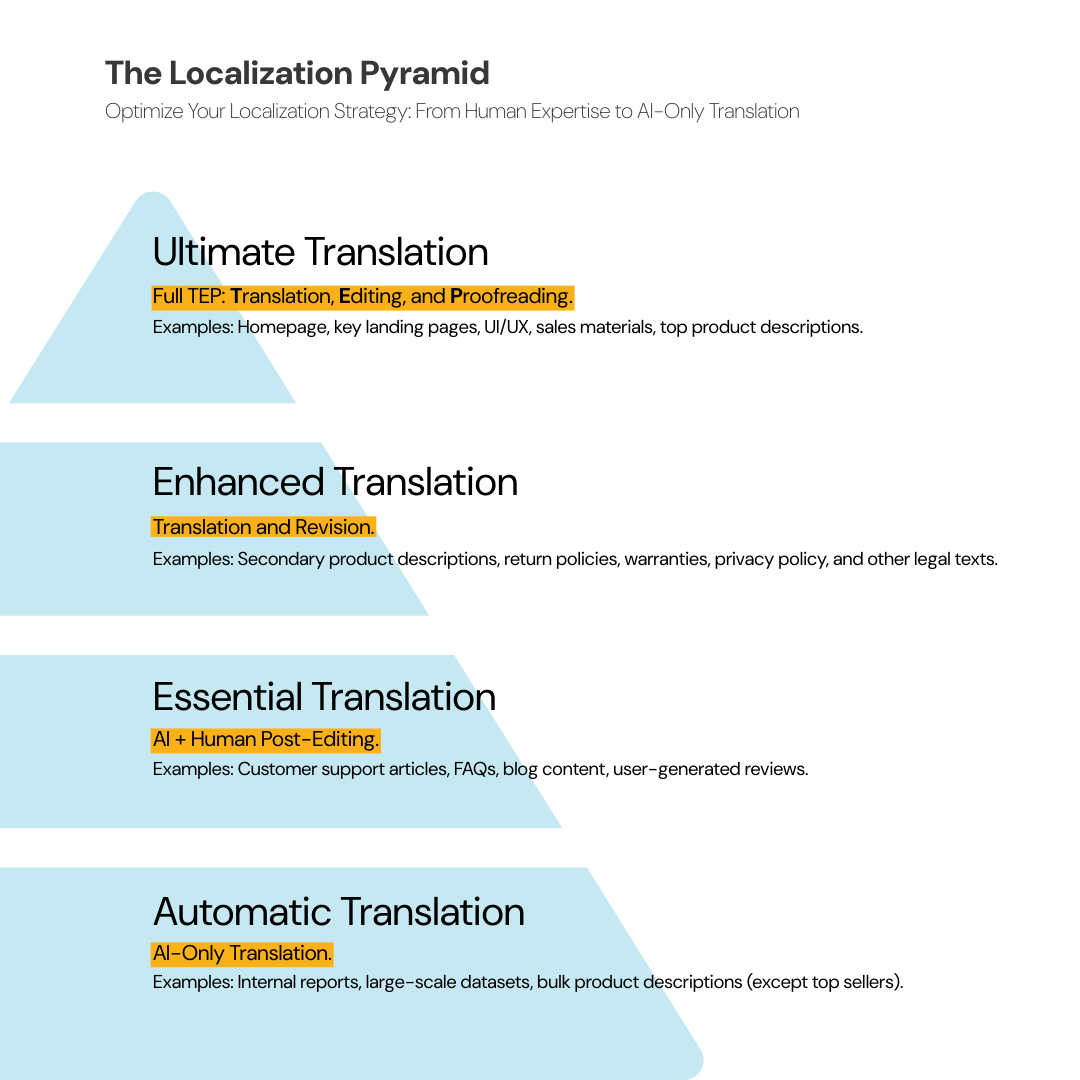
We call this the Localization Strategy Pyramid:
- Tier 1 (Top): Full human translation + editing + proofreading — Homepage, key landing pages, UI/UX, marketing materials. These drive conversions; errors here cost real money.
- Tier 2: Human translation + review — Legal documents, important product info, secondary marketing pages. Accuracy matters, but creative adaptation is less critical.
- Tier 3: AI + human post-editing — Support knowledge bases, lower-priority blog content, user-generated content. Needs to be understandable, not perfect.
- Tier 4 (Base): AI-only translation — Internal reports, bulk product catalogs, large datasets. Speed and scale matter; stylistic perfection doesn’t.
This follows the Pareto Principle (80/20 rule): 80% of your content can be handled by AI to save time, while 20% of high-impact content gets professional human review for cultural resonance.
When you review and approve translations, the AI learns your preferences. Over time, even your bulk AI translations become more accurate and on-brand.
Want the full localization strategy guide?
Learn how to apply the pyramid framework to maximize ROI on every translation project.
Read the Localization Strategy Guide →Hybrid strategy by content type
| Content Type | Recommended Approach | Tool |
|---|---|---|
| Functional UI (cart, checkout, chat) | Live proxy | Weglot / LangShop |
| Product catalog (thousands of SKUs) | File-based AI | Taia AI translator |
| Brand messaging (homepage, about, CTAs) | AI + human review | Taia + optional human review |
| SEO meta tags | Native API | LangShop / Transcy |
| Dynamic reviews, popups | Live proxy | Weglot / Transcy |
| Support documentation | AI-only | Taia AI translator |
The Weglot + Taia partnership in practice
As we discussed in the Weglot section, these tools complement each other perfectly for hybrid setups:
- Weglot handles infrastructure — SEO, URL management, language switching, third-party widget translation
- Taia handles bulk translation — Export from Weglot → translate with Taia’s AI → reimport polished content
This gives you:
- ✅ Weglot’s technical convenience for dynamic UI
- ✅ Taia’s AI translation for catalog and static content
- ✅ AI that learns your preferences over time
- ✅ Permanent ownership of your catalog translations
Learn more about this partnership approach →
Why this works
The hybrid approach lets you scale without being trapped by monthly word-count limits. It provides flexibility to upgrade specific pages based on conversion data — launch with AI, then invest in human review for pages that drive sales.
Few competitors explain this well because it requires recommending multiple tools. But for serious international sellers, it’s often the most strategic path.
Choosing your Shopify translation architecture
The “best” translation app depends entirely on your store’s reality:
| Store Profile | Recommended Approach |
|---|---|
| Testing 1-2 markets, tight budget | Shopify Translate & Adapt (free) + Taia free tier |
| Stable catalog, want ownership | Taia AI translator — translate once, own forever |
| High-velocity, hands-off needed | Weglot — premium automation, instant setup |
| Large catalog, cost-conscious | Transcy — unlimited words, AI flexibility |
| Niche markets, RTL needs | LangShop — 241+ languages, native integration |
| Conversion-focused | Hextom — translation + currency synergy |
| Enterprise, complex needs | Hybrid — proxy for UI, Taia AI for catalog |
The 2026 merchant should view translation not as a cost to minimize but as a strategic asset to build. Whether through permanent file-based ownership, real-time proxy automation, or a sophisticated hybrid of both — the goal remains speaking your customer’s language with the same trust and clarity as a local store.
That’s the true differentiator in global ecommerce.
Ready to translate your Shopify store?
Start with Taia’s free tier — 5,000 words/month, no credit card required. Export your catalog, translate instantly, own forever.
Start Translating Free →FAQ: Choosing the right Shopify translation tool
What is the best translation app for Shopify?
There’s no single “best” — it depends on your store’s needs:
- For stable catalogs wanting permanent ownership: Taia AI translator — translate with AI, own forever, 5,000 words/month free
- For hands-off automation with dynamic content: Weglot — instant setup, automatic detection
- For unlimited words on a budget: Transcy — no per-word scaling costs
- For linguistic breadth (240+ languages): LangShop — including RTL support
- For translation + currency conversion: Hextom — addresses two conversion barriers
- For testing 1-2 markets free: Shopify Translate & Adapt — limited but no cost
Most serious international sellers end up using a hybrid approach — different tools for different content types.
Is Weglot worth it for Shopify stores?
Weglot is worth it when speed-to-market and automation are your priorities. If you have high-velocity content (daily updates, heavy third-party app usage) and margins that support usage-based fees, Weglot’s “set and forget” convenience is genuinely valuable.
It becomes less worthwhile for large stores with stable catalogs. Paying $329/month for millions of words that rarely change is inefficient when file-based alternatives offer one-time costs.
The middle ground: use Weglot for dynamic UI elements while handling your catalog through Taia’s file-based translation. Learn more about this partnership →
Who are the competitors of Weglot?
Major Weglot competitors include:
- Transcy — Similar live proxy approach with unlimited words and AI image translation
- LangShop — Native Shopify integration with 241+ languages
- Taia — Different approach (file-based AI) but can work alongside Weglot or as a standalone for stores wanting permanent ownership
- GTranslate — More affordable but less sophisticated
- Langify — Long-standing Shopify translation app
What’s the cheapest way to translate a Shopify store?
The most economical path combines free tools strategically:
- Use Shopify Translate & Adapt for your first two languages (free)
- Add Hextom’s free tier for currency conversion (3 auto-translate languages)
- Export remaining content as CSV and translate via Taia’s free tier (5,000 words/month)
- Import translations back to Shopify
This gets you a multilingual store for $0/month in app fees. The trade-off is manual workflow for content beyond two languages.
Is Shopify Translate and Adapt free?
Yes, Shopify Translate & Adapt is 100% free. However, it only supports automatic translation for two languages. Beyond that, you’ll need to manually translate content or use paid third-party apps.
It also requires manual triggers — when you add new products, you must remember to go back and run auto-translate. This creates gaps if you forget.
Can I translate Shopify without a monthly fee?
Yes. Shopify supports up to 20 languages in your store settings. You can:
- Export your language database as CSV (Settings → Languages → Export)
- Translate via Taia’s free AI translator (5,000 words/month) or a freelance translator
- Import the translated CSV back to Shopify
Once imported, translations live permanently in your Shopify database. No app needed to “serve” them to customers.
This is the file-based model’s core advantage: translate once, own forever.
What’s the difference between live proxy and file-based translation?
Live proxy (Weglot, Transcy) intercepts your website in real-time, replacing text before pages render. It’s fast, automatic, and handles dynamic content well — but it’s a subscription. Stop paying and translations disappear.
File-based (Taia) is a discrete project: export content, translate it, import it back. Requires more setup but gives you permanent ownership and predictable one-time costs.
| Factor | Live Proxy | File-Based |
|---|---|---|
| Setup speed | Minutes | Hours |
| Dynamic content | Automatic | Manual re-export |
| Data ownership | Rented | Permanent |
| Pricing model | Monthly subscription | One-time payment |
| Best for | High-velocity stores | Stable catalogs |
How do I translate on Shopify? (Export content for translation)
- Go to Settings → Languages in Shopify admin
- Click Export and select your target language
- Choose content types: “All Content” or “Untranslated Content”
- Shopify emails you a CSV file
Upload this CSV to a translation platform like Taia, or work with it manually. After translation, import via the same Settings → Languages panel.
Note: Checkout notifications and some third-party app content may need separate export from their respective settings.
Does DeepL work with Shopify?
DeepL isn’t a Shopify app itself, but several Shopify translation apps use DeepL as their underlying AI engine:
- Transcy — Offers DeepL as one of several AI engine options
- LangShop — Includes DeepL Pro integration
- Weglot — Uses DeepL as one of its MT providers
If you specifically want DeepL’s translation quality, choose an app that lets you select DeepL as the engine. Alternatively, export your Shopify content and use DeepL directly (or through Taia’s platform which incorporates multiple AI models including enterprise-grade options).

Project Manager & Content Writer
Eva is a project manager and occasional content writer who has honed her skills in marketing localization since 2019. Like most millennials, she's a Potterhead. She loves traveling and collecting bookmarks, used books, and vinyl.